System Settings
The System page provides system-wide configuration and operational controls.
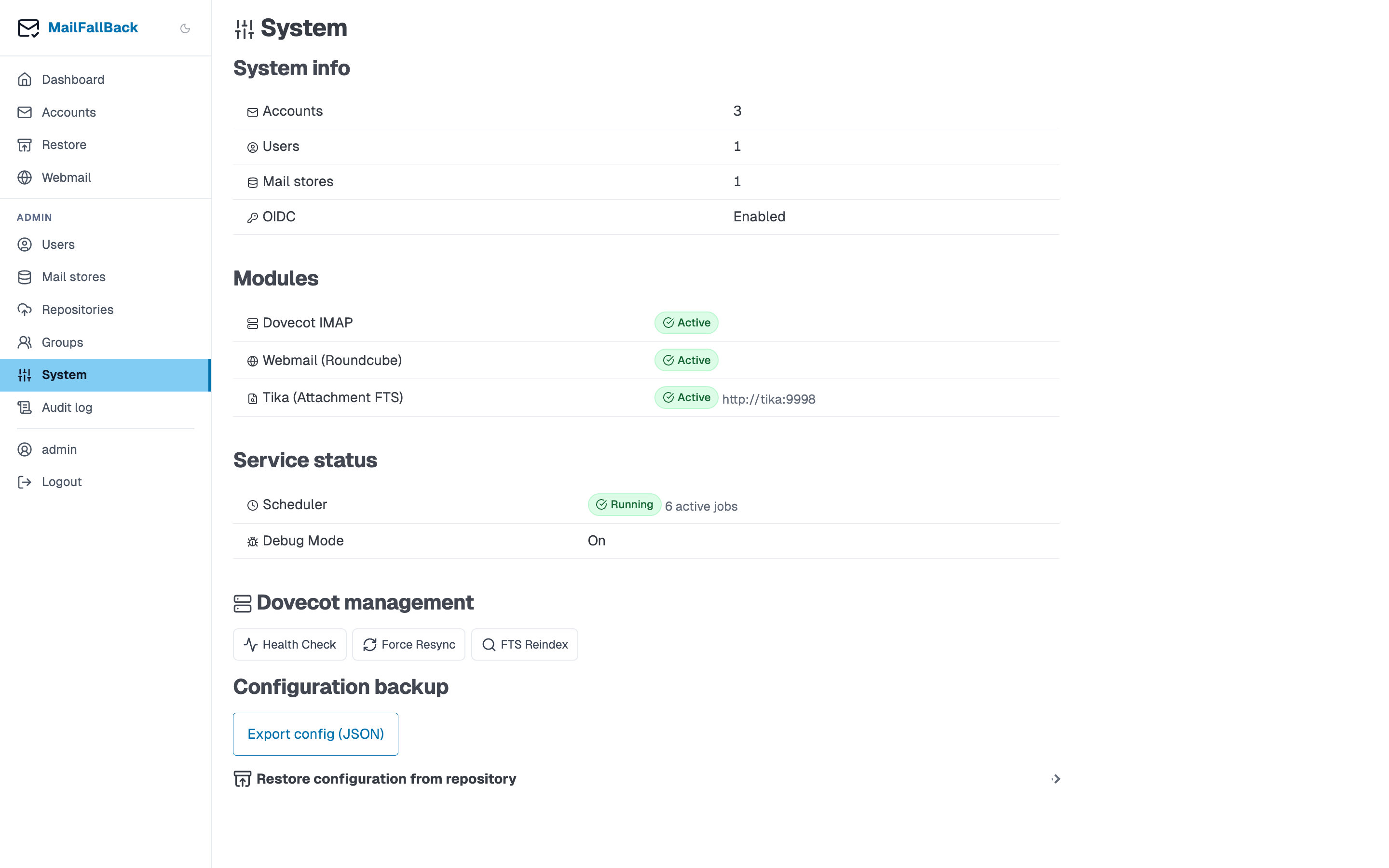
Modules
The modules section shows which optional components are active:
| Module | Status | Description |
|---|---|---|
| Webmail | Enabled/Disabled | Roundcube integration |
| FTS | Enabled/Disabled | Full-text search (always on when Dovecot is available) |
| Tika | Enabled/Disabled | Attachment content indexing |
Module status is determined by environment variables and service availability.
Service Status
Real-time health check of connected services:
- Dovecot - checks the doveadm HTTP API endpoint
- Tika - checks the Tika REST API endpoint
- Database - PostgreSQL connection status
- Scheduler - whether APScheduler is running and processing cron jobs
FTS Reindex
Trigger a full-text search reindex across all accounts. This is useful after:
- Enabling or disabling Tika
- Recovering from corrupted FTS indexes
- Upgrading Dovecot
The reindex runs as a background task. Progress is shown on the System page.
Automatic reindex
MFB automatically triggers a reindex when it detects that the FTS configuration has changed (e.g. Tika was toggled). You normally do not need to trigger this manually.
Force Resync
Force an immediate sync of all accounts, ignoring schedules. This queues a sync job for every enabled account. Useful after a bulk import or when you want to ensure all accounts are up to date.
Health Check
The System page shows the results of the application health check endpoints:
/healthz- basic liveness check/readyz- readiness check including database connectivity
These are the same endpoints used by Docker health checks and Kubernetes probes.
Background Tasks
Active background tasks are displayed with progress:
- FTS Reindex - progress bar showing accounts processed
- Store Migration - per-account progress with file counts
Tasks can be monitored but not cancelled from this page (migrations can be cancelled from the account detail page).
Config Export / Import
Export the current MFB configuration (accounts, users, groups, stores) as a JSON file, or import from a previously exported file. This is useful for:
- Backing up MFB's own configuration
- Migrating between MFB instances
- Disaster recovery
Credentials
Exported configs include encrypted credentials. They can only be imported into an instance with the same MAILFALLBACK_SECRET_KEY. If the secret key differs, imported accounts will need their credentials re-entered.
Access tokens are not exported
Per-user access tokens (AppCredential) are deliberately excluded from the
export, consistent with notification channels — re-create them on the new
instance if needed. Separately, rotating MAILFALLBACK_SECRET_KEY invalidates
every existing access token, since each token's secret_hash is a keyed-HMAC
keyed to that secret.
Prometheus Metrics
MFB exposes metrics at /metrics for Prometheus scraping:
mailfallback_accounts_total- total account countmailfallback_accounts_error- accounts in error statemailfallback_sync_jobs_total- sync job counts by statusmailfallback_messages_total- total backed-up messagesmailfallback_storage_bytes- total maildir storage used
Protect the endpoint with MAILFALLBACK_METRICS_API_KEY. Prometheus sends the key as a Bearer token in the Authorization header: